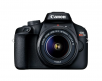
|
Use $146.88 off Canon Coupon POTATOES [Exp. 03/19]
FREE SHIPPING.
Type
Digital, AF/AE single-lens reflex camera with built-in flash
Recording Media
SD, SDHC and SDXC Memory Cards
SD speed class compatibility.
UHS speed class compatibility.
High-speed writing is supported when a UHS-I-compatible SD card is used.
Compatible with Eye-Fi Cards.
Multimedia cards (MMC) cannot be used (card error will be displayed).
Image Format
Approx. 22.5mm x 15.0mm (APS-C)
Compatible Lenses
Canon EF Lenses (including EF-S lenses, excluding EF-M lenses)
Lens Mount
Canon EF Mount
Back to TopImage Sensor
Type
CMOS Sensor
Pixels
Approx. 24.2 megapixels
Pixel Unit
Approx. 3.72 µm square
Total Pixels
Approx. 25.8 megapixels
Aspect Ratio
3:2 (Horizontal: Vertical)
Color Filter System
RGB primary color filters
Low Pass Filter
Fixed position in front of the image sensor
Dust Deletion Feature
(1) Self Cleaning Sensor Unit
Removes dust adhering to the low-pass filter.
Self-cleaning can be done automatically when the power is turned on or off. Manual cleaning also possible.
(2) Dust Delete Data acquisition and appending
The coordinates of the dust adhering to the low-pass filter are detected by a test shot and appended to subsequent images.
The dust coordinate data appended to the image is used by the EOS software to automatically erase the dust spots.
(3) Manual cleaning
Back to TopRecording System
Recording Format
Design Rule for Camera File System 2.0 and EXIF 2.3
Image Format
Still Image: JPEG, RAW (14 bit Canon Original), M-RAW, S-RAW, RAW+JPEG, M-RAW+JPEG, S-RAW+JPEG
Video: MOV (Full HD Movie: MPEG4 AVC/H.264*; Audio: Linear PCM), MP4 (Movie: MPEG4 AVC/H.264*; Audio: AAC)
* Variable (averaged) bit rate
File Size
3:2 Aspect Ratio
Large: 24.0 Megapixels (6000 x 4000)
Medium: Approx. 10.6 Megapixels (3984 x 2656)
Small 1: Approx. 5.9 Megapixels (2976 x 1984)
Small 2: Approx. 2.5 Megapixels (1920 x 1280)
Small 3: Approx. 0.35 Megapixels (720 x 480)
RAW: 24.0 Megapixels (6000 x 4000)
mRAW: 13.5 Megapixels (4500 x 3000)
sRAW: 6.0 Megapixels (3000 x 2000)
4:3 Aspect Ratio
Large: Approx. 21.3 Megapixels (5328 x 4000)
Medium: 9.5 Megapixels (3552 x 2664)
Small 1: Approx. 5.3 Megapixels (2656 x 1992)
Small 2: Approx. 2.2 Megapixels (1696 x 1280)
Small 3: Approx. 0.31 Megapixels (640 x 480)
RAW: 24.0 Megapixels (6000 x 4000)
mRAW: 13.5 Megapixels (4500 x 3000)
sRAW: 6.0 Megapixels (3000 x 2000)
16:9 Aspect Ratio
Large: Approx. 20.2 Megapixels (6000 x 3368)
Medium: Approx. 8.9 Megapixels (3984 x 2240)
Small 1: Approx. 5.0 Megapixels (2976 x 1680)
Small 2: Approx. 2.1 Megapixels (1920 x 1080)
Small 3: Approx. 0.29 Megapixels (720 x 408)
RAW: 24.0 Megapixels (6000 x 4000)
mRAW: 13.5 Megapixels (4500 x 3000)
sRAW: 6.0 Megapixels (3000 x 2000)
1:1 Aspect Ratio
Large: Approx. 16.0 Megapixels (4000 x 4000)
Medium: Approx. 7.1 Megapixels (2656 x 2656)
Small 1: Approx. 3.9 Megapixels (1984 x 1984)
Small 2: Approx. 1.6 Megapixels (1280 x 1280)
Small 3: Approx. 0.23 Megapixels (480 x 480)
RAW: 24.0 Megapixels (6000 x 4000)
mRAW: 13.5 Megapixels (4500 x 3000)
sRAW: 6.0 Megapixels (3000 x 2000)
Values of Pixels recorded are rounded off to the nearest 10,000th or 1,000th.
JPEG images are generated in the aspect ratio that was set.
RAW images are generated in [3:2] and the set aspect ratio is appended.
Backup Recording
N/A
File Numbering
The following three types of file numbers can be set:
Continuous numbering
The numbering of captured images continues even after you replace the card.
Auto reset
When you replace the card, the numbering will be reset to start from 0001. If the new card already contains images, the numbering will continue from the last recorded image in the card.
Manual reset
Resets the file number to 0001, and creates a new folder automatically.
Color Space
sRGB, Adobe RGB
Picture Style
Auto
Standard
Portrait
Landscape
Fine Detail
Neutral
Faithful
Monochrome
User Defined 1-3
In Basic Zone modes, "Auto" is set automatically.
In Creative Zone modes, you can select or set the Picture Style.
[Auto] is the default setting for [User Def. 1-3].
Back to TopWhite Balance
Settings
Auto, Daylight, Shade, Cloudy*, Tungsten Light, White Fluorescent Light, Flash, Custom, Color Temperature setting
* Effective in twilight and sunset as well.
Auto White Balance
Option between ambience priority and white priority settings
Color Temperature Compensation
Blue/amber bias: ±9 levels
Magenta/green bias: ±9 levels
*Corrected in reference to the current WB mode's color temperature.
|




 Homepage Popular Deals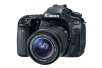
 Discuss