|
FREE SHIPPING.
FEATURES - ON THE BUTTON
Transpose is extremely useful but different situations require different functionality. So it's great to be able to change the MIDI channel or send MIDI Program messages too. The two transpose buttons are quickly configured to any of these functions with setting stored over power cycling. Better still, pressing a key combination change the Octave and Transpose buttons function to send out MMC transport functions so you can activate start, stop and record directly from your keyboard.
INTEGRATION
Nektar DAW integration is carefully crafted to give the best experience with your Nektar hardware. And having to reach for the mouse constantly does not help creativity even if your overall needs are basic. We therefore added some of the most important features to the Impact SE49 including Transpose button assignment for Track or Patch change, volume control for the currently selected track and a special transport mode for Octave and Transpose buttons which allows you to control Play, Stop, Record and Rewind. Impact SE49 ticks all the right boxes.
SUPPORTED DAWs
A growing list of DAWs supported by Nektar DAW integration now includes: Bitwig Studio, Cubase, Digital Performer, FL Studio, GarageBand, Logic, Nuendo, Reaper, Reason, Sonar and Studio One
CONNECTORS & iPAD CONNECTIVITY
Impact SE49 keyboards are USB class compliant and therefore don't require a driver to operate. So installation and connection is easy; just plug the keyboard in to a USB port on your computer. You can also connect an Impact SE49 keyboard to an iPad using the iPads optional USB camera connection kit. A 1/4" input jack allows you to add a foot switch pedal for sustain or sending MIDI messages.
|






 Homepage Popular Deals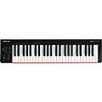
 Discuss