|
Use 60% off coupon code AVCB60POFF [Exp. 11/13]
FREE SHIPPING.
Tax in CA, MA.
Setting Up Your iPod Video Options Before Watch iPod Video on TV
1.Turn on your iPod, choose Videos -> Video Settings from your main iPod menu. This screen will show three settings: TV Out, TV Signal and Widescreen.
2.Select TV Out, make sure you select "On" that will produce TV signal.
3.TV Signal: If you live in the U.S., your TV works with the NTSC standard. European countries mostly use PAL.
4.Widescreen: You can choose "On" to produce a widescreen signal (16:9), or "off" to export the traditional TV output (4:3).
|






 Homepage Popular Deals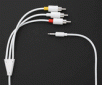
 Discuss