|
FREE SHIPPING.
Tax in CA, MA.
The AV Cable allows you to connect your iPod with color screen to your home entertainment system. Now you can view your videos, pictures or slideshows with audio on your home television.
Setting Up Your iPod Video Options Before Watch iPod Video on TV
1.Turn on your iPod, choose Videos -> Video Settings from your main iPod menu. This screen will show three settings: TV Out, TV Signal and Widescreen.
2.Select TV Out, make sure you select "On" that will produce TV signal.
3.TV Signal: If you live in the U.S., your TV works with the NTSC standard. European countries mostly use PAL.
4.Widescreen: You can choose "On" to produce a widescreen signal (16:9), or "off" to export the traditional TV output (4:3).
|




 Homepage Popular Deals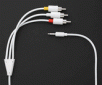
 Discuss