$79.99
$51.99
[Click Here]
Deal May Have Expired


At Western Digital ; Updated 3907 days ago; posted by hw ;

  • Shipping is $5.99.

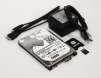
  • 1. Remove the microSDTM card from the SD adapter/case and plug it into the Raspberry Pi.

    Note: You will need to put your operating system of choice on the microSDTM card before the Raspberry Pi will boot.

    2. Connect the USB 3.0 Micro B male plug to WD PiDrive.

    3. Connect the USB 3.0 Type A male plug to a USB port on the Raspberry Pi.

    4. Connect the USB Micro B male plug to the power port on Raspberry Pi.

    5. Connect the USB Micro B Female to the USB Micro B male connector on the power cord.

    6. Plug the USB Type A male plug of the power cord into the provided 5V power adapter.

    7. Plug the USB Type A male plug of the power cord into the provided 5V power adapter.

    ORICO USB Type C to SATA 2 Bay Hard Drive Docking Station for 2.5 or 3.5 in HDD SSD with 2 in 1 USB C to A/C Cable
    $44.99 $23.99
    Lexar 2TB SL500 USB 3.2 Gen 2x2 Portable SSD
    $399.99 $189.99.
    ORICO 2.5 inch Hard Drive Enclosure USB C to SATA III 5Gbps Clear External Hard Drive Case
    $10.99 $5.49
    Lexar 1TB SL500 USB-C 3.2 Gen 2x2 Portable SSD with Magnetic Set
    $264.99 $124.99
      Comments

    log in to comment or register here.
    2-Ct Western Digital WD Red Pro 7200 RPM SATA III 3.5" Internal NAS Hard Drives: 26TB $900, 24TB $800
    $180.00 $899.98
    Western Digital - Western Digital Elements USB 3.0 External Hard Drives: 14TB $169.99, 20TB $269.99
    $279.99 $169.99
    14TB Western Digital WD Gold Enterprise Class 3.5-Inch 7200 RPM Internal Hard Drive
    $319.99 $239.99
    2-Ct 26TB WD Red Pro 7200 rpm SATA III 3.5" Internal NAS Hard Drives (WD260KFGX)
    $1040.00 $899.98