Shipping is $5.99.
1. Remove the microSDTM card from the SD adapter/case and plug it into the Raspberry Pi.
Note: You will need to put your operating system of choice on the microSDTM card before the Raspberry Pi will boot.
2. Connect the USB 3.0 Micro B male plug to WD PiDrive.
3. Connect the USB 3.0 Type A male plug to a USB port on the Raspberry Pi.
4. Connect the USB Micro B male plug to the power port on Raspberry Pi.
5. Connect the USB Micro B Female to the USB Micro B male connector on the power cord.
6. Plug the USB Type A male plug of the power cord into the provided 5V power adapter.
7. Plug the USB Type A male plug of the power cord into the provided 5V power adapter.
|






 Homepage Popular Deals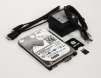
 Discuss