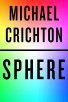
log in, click on 'Get this Reward', and apply your unique promo code at Visit Xfinity Rewards Bookshelf on Amazon
Deal Instructions:
1. Log in to your
Xfinity Account
2. Navigate to Rewards
3. Click on the following offer: Shop our Bookshelf with $10 and grab a winter favorite
4. Copy your code and select "
Visit Xfinity Rewards Bookshelf" at Amazon (login to your account)
5. Pick out your book(s) and what book type (digital, paperback or hardcover)
6. Apply the unique promo code at checkout
7. You'll get a $10 discount on your total.
Note: Complete your purchase by December 31, 2024




 Homepage Popular Deals
 Discuss