|
$50 rebate
[Exp. soon]
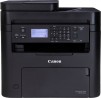
1320c Network Color Laser PrinterOverviewGet crisp and fast color laser printing from the compact 1320c Color Laser Printer from Dell. Brighten up your presentations with sharp professional laser quality hand-outs. With printing speeds of upto Monochrome: 16 PPM (A4 and letter) and Color: 12 PPM (A4 and letter) (actual print speed will vary with use), 1320c ensures excellent performance every time you print. It delivers professional-quality documents with crisp text and sharp details at resolutions of up to 600x600 dpi. The printer comes equipped with a 333 MHz processor and 64 MB of RAM in a stylish and compact design which will fit virtually an home or business environment. Designed for high printing volumes and great usage demands, it provides a duty cycle of 35,000 pages per month. It provides effortless setup and installation via USB port or 10Base-T/100BaseTX, TCP/IP Ports.At a Glance Quality: Crisp, fast color laser printing from a compact design
Professional: Sharp, professional laser-quality output
Compact: Stylish, small footprint unit - can fit any home or business environment
Value: Up to 12 color pages per minute print speed, up to16 pages per minute in monochrome with a low printing cost per page (actual print speeds will vary with use).Fast, Professional Quality Color
Why spend time and money going to a print shop when you can produce your own professional quality color printouts from your home or office?Crisp, vibrant color prints at up to 12 pages per minute (actual print speeds will vary with use).
Easy-fit 1,0001 and 2,0001 page capacity toner refill cartridges available for added flexibility.Dell Color Track 2
When sharing the 1320c Network with PCs on your network, Dell provides you with Color Track 2 network printer management software to help manage your color printing costs. Color Track 2 gives you the ability to create up to 50 user or department accounts and monitor print jobs per account. Enable, disable or set limits for color and black & white printing - Color Track 2 lets you control everything remotely using the Dell Printer Web Configuration ToolDell support website for Mac OS X system driver: http://www.dealigg.com/shop.php?id=636944&url=http://support.dell.com/support/downloads/driverslist.aspx?os=MAC1&catid=-1&dateid=-1&impid=-1&osl=EN&typeid=-1&formatid=-1&servicetag=&SystemID=PRN_LSR_1320C&hidos=WW1&hidlang=en&TabIndex=&scanSupported=True&scanConsent=False
|



 Homepage Popular Deals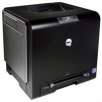
 Discuss