|
FREE SHIPPING.
Epson WorkForce WF-2540 All-in-One Printer
Ideal for the space-constrained home office, the WorkForce WF-2540 is a fast, high-performance all-in-one that offers affordable, individual ink cartridges and a space saving, compact design - the smallest in its class. Featuring a 2.5" LCD for easy navigation, the WF-2540 saves time with fast speeds of 9 ISO ppm (black) and 4.7 ISO ppm (color), plus a convenient, 30-page Automatic Document Feeder. The WF-2540 comes with both wired and built-in wireless connectivity for easy setup and sharing on your network. And, it includes EPSON Connect™ so you can print and scan from anywhere.
4-in-one: print, copy, scan, fax
Network Ready; Wired Ethernet (10/100 Mbps), Hi-Speed USB and Wireless (802.11 b/g/n) connectivity
Easy navigation - 2.5" LCD makes it simple
EPSON Connect™ - Print and scan from anywhere - convenient mobile printing from smartphones, tablets and more; also supports Apple AirPrint and Google Cloud Print
PC-Fax - fax documents directly to/from your computer
Multifunction Capability
The Epson Workforce can produce colorful prints at a speed of 4.7 pages per minute and black-and-white documents at a speed of nine pages per minute when working in either the printer or copier modes. The printer is also capable of sending and receiving faxes with a fax speed of 33.6 Kbps. For inputting documents, the all-in-one device contains a flatbed scanner, which can save color scans of documents to your system.
Network Ready
The Workforce is ready for networking, with an included wired Ethernet adapter that can be used to connect with a wired router or hub and a wireless 802.11 b/g/n adapter that can connect with a wireless router. After connection, any computer also present on the network can use the device. For those wishing to use the printer with a single computer, a USB interface is included.
Mobile Device Support
The printer can be used with a variety of mobile devices, from smartphones to tablets. It can also utilize Apple AirPrint technology to allow you to print directly from an Apple handheld device. If the printer is connected to the Internet, you can print documents from the Web directly to your printer no matter where your computer is located by using Google Cloud Print.
|



 Homepage Popular Deals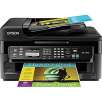
 Discuss