On PC
Download the
Xbox App for Windows PC for Free
Install/open it and login to your account
Under the 'Game Pass' section locate the 'Perks' tab and select it
Locate the 'Black Clover (Season 1/Part One)' offer and claim the offer
You'll then receive a unique code to apply to your
Microsoft account
On Xbox Consoles
Turn on your Xbox One or Series X|S consoles
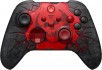
On your controller, press the Xbox logo
Scroll down to the 'Game Pass' menu selection on the bottom
Locate the 'Claim your Perks Now' section and click it
Locate the 'Black Clover (Season 1/Part One)' offer and claim the offer
You'll then receive a unique code to apply to your
Microsoft account
On Xbox GamePass App
Install the GamePass app for
Android or
iOS
Login to your Xbox / Microsoft account
Click the human-shaped icon at the bottom-center of the app
Scroll through the 'Perks' row and tap on the Black Clover offer banner
Tap 'Claim'
Your unique code to apply to your
Microsoft account will be displayed on screen.


 Homepage Popular Deals
 Discuss